Multi-Account Management

Manage multiple platform accounts with isolated browser profiles

AdsPower helps growth teams create, isolate, switch, and maintain multiple account environments across Facebook, Amazon, Google, TikTok, LinkedIn, and other platforms. Each account can run inside its own browser profile with separate fingerprints, proxy settings, cookies, cache, and local data, reducing account linkage risk and improving daily operations.

  • Manage multiple platform accounts in one workspace
  • Create isolated browser profiles quickly
  • Keep proxy, region, and profile settings consistent
  • Store cookies, cache, passwords, and local data securely
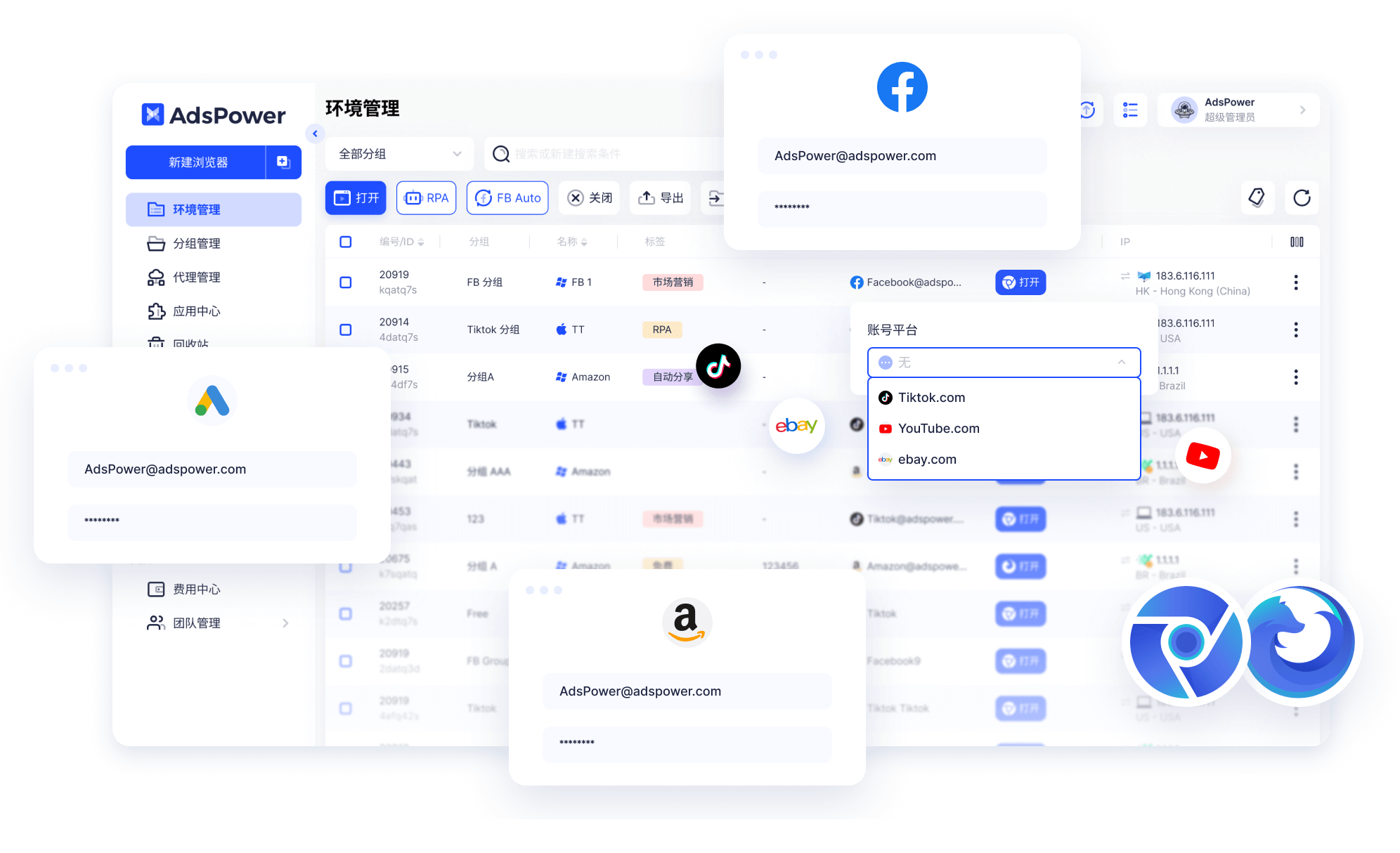
AdsPower multi-account browser interface for isolated profile management

Why multi-account teams need browser profile isolation

When multiple accounts share the same browser cache, device signals, IP behavior, or local storage, platform systems may connect them as related environments. AdsPower separates account data into isolated browser profiles so teams can manage accounts with clearer boundaries, cleaner workflows, and lower operational friction.

What happens without isolated profiles

  • Accounts are more likely to trigger linkage signals, restrictions, or repeated verification
  • Operators waste time logging in, logging out, and switching accounts manually
  • Shared cache, cookies, and device data make account environments harder to control
  • Team collaboration becomes unclear when profiles, proxies, notes, and permissions are mixed

Benefits of using AdsPower

  • Create isolated browser profiles for different platforms, regions, projects, and team members
  • Manage fingerprints, proxies, cookies, cache, and local data at the profile level
  • Switch between accounts faster without repeatedly rebuilding browser environments
  • Combine multi-account management with team permissions, automation, and batch workflows

Explore more multi-account management capabilities

From account isolation and fingerprint control to bulk management, automation, and cross-platform compatibility, AdsPower gives growth teams a practical operating system for managing many accounts without losing profile-level structure.

01

Create multiple accounts across platforms

Run browser profiles for Facebook, Amazon, Google, TikTok, LinkedIn, Discord, marketplace dashboards, ad platforms, and other web services. You can create, import, export, and share profiles in bulk, making AdsPower suitable for ad buying, e-commerce, affiliate marketing, and social media operations teams.

02

Customize browser fingerprints for each profile

Assign a unique browser fingerprint to every account environment and configure parameters such as IP, GEO, language, timezone, cookies, WebGL, WebGPU, Canvas, and device signals. The goal is to keep each account profile stable, consistent, and separated from other profiles.

03

Automatic account cache and local data backup

Preserve cookies, LocalStorage, IndexedDB, extension data, and other profile-level information so important login states and account context remain available after closing a browser profile. This reduces repeated logins, verification interruptions, and operational data loss.

04

Chrome and Firefox dual-engine support

Choose between the Chrome-based SunBrowser and the Firefox-based FlowerBrowser according to platform requirements, extension needs, account workflows, and testing goals. Different engines make it easier to match platform compatibility and profile operation habits.

05

Support for multiple operating systems

Use AdsPower across Windows, macOS, Linux, and supported mobile-like environment scenarios so teams can keep multi-account workflows consistent across regions, devices, collaborators, and operating habits.

Built for these multi-account business scenarios

Whether you operate e-commerce stores, affiliate campaigns, ad accounts, social media matrices, or browser-based workflows, AdsPower provides isolated profile management for teams that need more stable multi-account operations.

E-commerce

Operate multiple stores, marketplace accounts, regional profiles, and team roles while reducing environment mixing caused by shared browsers, cache, or unmanaged proxy settings.

Affiliate Marketing

Manage ad accounts, affiliate dashboards, offer testing profiles, and campaign workflows in bulk so multiple projects can run with clearer profile separation.

Social media matrix

Maintain separate fingerprints, cookies, proxies, and local data while operating multiple social accounts to reduce verification friction and profile confusion.

Ad buying

Allow different team members to work with isolated environments for account nurturing, campaign checks, creative workflows, landing page reviews, and account maintenance.

Frequently asked questions

What is multi-account management?

Multi-account management means creating, switching, maintaining, and collaborating on multiple platform accounts while keeping account environments separated. It usually involves browser profiles, proxies, cookies, cache, local data, team permissions, and account status tracking.

How does AdsPower help reduce account linkage?

AdsPower uses isolated browser profiles, customizable fingerprints, separate cache, proxy configuration, cookies, and local storage to keep different account environments apart. This helps reduce the chance that multiple accounts are recognized as sharing the same device or browser environment.

Which platform accounts can be managed?

Common scenarios include Facebook, Amazon, Google, TikTok, LinkedIn, Discord, eBay, YouTube, marketplace dashboards, ad platforms, and other web services that require multiple account logins, profile maintenance, and team collaboration.

Can team members share account environments?

Yes. AdsPower supports browser profile sharing and team permissions. Profiles can be assigned by member, role, project, business line, or account group so collaboration is clearer and high-risk actions can be controlled by admins.

How is AdsPower different from normal browser multi-login?

Normal browser multi-login often still shares device signals, cache, or local traces. AdsPower focuses on isolated browser profiles with separate fingerprints, proxies, cookies, local storage, notes, permissions, and automation workflows for long-term multi-account operations.
AdsPower fingerprint browser logo AdsPower

From account creation to scaled operations, make multi-account management safer

Download AdsPower to create isolated browser profiles, configure proxies, manage fingerprints, store profile data, and coordinate multi-account workflows with your team.

Download Now View Pricing